How to Know Which Athlete Needs Your Attention Today
You coach twelve athletes. It’s Sunday evening. There are 50+ sessions from the week for you to review, and unread messages in six threads.
So where do you start?
Most coaches start alphabetically. Or with whoever messaged last. Or with the athlete racing next week. None of those is the same as starting with the athlete who actually needs you — and the gap between those two things is where problems grow quietly for three weeks before anyone notices.
The problem isn’t missing data. It’s too much of it.
Endurance coaching has no data shortage. Garmin, Strava, Coros, Wahoo, Polar and Zwift all push files automatically. Every session arrives with pace, power, heart rate, elevation and time in zone. Add the athlete’s own feedback on top — how they felt, what hurt, what they ate — and a single athlete can generate a dozen data points a day.
Multiply that by a roster and you get the real problem: everything is recorded, and nothing stands out.
The signals that matter most are usually the quietest ones. A knee mentioned in passing halfway through a chat message. An RPE that crept from 5 to 7 on the same session she’s done for a month. A power number that dropped four percent and stayed there. None of those trip an alarm. All of them are the early version of something you’d much rather catch now than three months later.
What actually counts as a signal
Across a roster, the things worth your attention tend to fall into three groups.
Something was said
An athlete mentions a niggle, a bad night’s sleep, a stressful week at work, or a change in motivation — usually buried in a longer message about something else. Subjective reporting is not soft data. A systematic review in the British Journal of Sports Medicine concluded that subjective self-reported measures track acute and chronic training load with superior sensitivity and consistency compared with commonly used objective measures. What your athlete tells you often moves before the numbers do — which is why we’ve written before about subjective feedback and objective data working together.
Something changed
An RPE spike relative to that athlete’s own baseline. Pace or power dropping at the same heart rate. Heart rate climbing at the same pace. The key word is context — a 250W tempo means nothing in isolation and everything against the athlete’s last six weeks.
Something stopped
Sessions quietly skipped. Feedback that used to come in every day and now doesn’t. Silence is one of the most reliable signals in coaching, and the easiest to miss, because nothing arrives to remind you.
How Athlete Signals works
Athlete Signals is the feature in augo that does this scan for you.
Overnight, augo reads the last seven days of data across every athlete on your roster — completed workouts and their metrics, session feedback including feel, aches and pains, RPE, fuelling and written or voice notes, chat conversations, and your own private coach notes. It compares each athlete against their own recent baseline rather than a population average.
By 7am, a ranked list is waiting on your home screen.
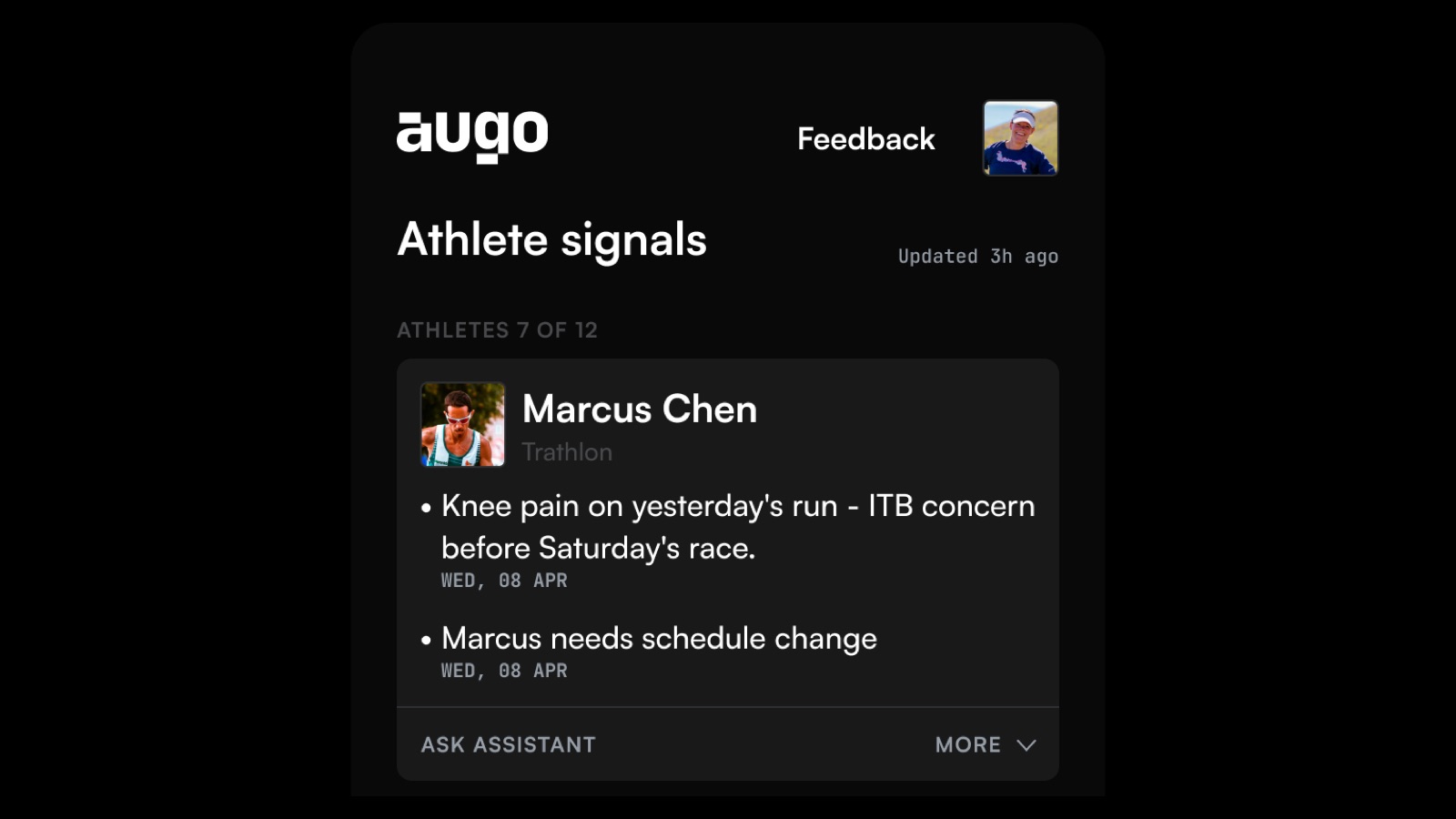
The header tells you how many athletes surfaced: 7 of 12. That second number matters as much as the first. The five who didn’t surface are fine, and knowing that is information too — it’s permission to not think about them today.
Each card names the athlete and their sport, then gives you the reason in one line: “Knee pain on yesterday’s run — ITB concern before Saturday’s race.” “Marcus needs schedule change.” Dated, so you can see whether it’s new or building. Tap Ask Assistant and you get the full context behind that signal — the actual message, the session it came from, the trend it sits in — without opening four screens to reconstruct it.
If you’re weighing this against the platform you already run, we’ve set out how augo compares to TrainingPeaks feature by feature.
What you do with the list
You work down it. Message the athlete, adjust the session, or make a note and check again tomorrow.
That’s the whole workflow, and the design goal behind it is deliberately modest: if you only handle what’s in Athlete Signals, you’ve done a good job that day. Not a perfect day. A good one. Everything beyond that list is coaching you’ve chosen to do, not coaching you’re anxious about having missed.
The decision stays with you
Athlete Signals doesn’t coach for you. It doesn’t tell you to cut Marcus’s volume or move Emma’s race. That’s up to you as a coach to decide, and it’s the same line we drew when we wrote about whether AI will replace endurance coaches.
What it does is cut through the noise so you don’t have to — and then hand the decision straight back to you. Because the judgement is the part that was always worth your morning.
Try it with your own athletes
Connect your roster and see what the first list looks like. augo is free for up to two athletes.
Frequently asked questions
How do I know which athlete needs my attention today?
Look for three things across your roster: something said (a niggle, poor sleep or life stress mentioned in a message or session note), something changed (RPE, pace, power or heart rate moving against that athlete’s own baseline), and something stopped (skipped sessions or feedback that has gone quiet). augo’s Athlete Signals scans all three automatically every night and gives you a ranked list at 7am.
What is Athlete Signals in augo?
Athlete Signals is a daily prioritised list of the athletes on your roster who need your attention. Each morning it reads the last seven days of workouts, session feedback, chat messages and private coach notes across every athlete, then surfaces the ones with something worth acting on — with a one-line reason and the full context one tap away.
How often does Athlete Signals update?
It refreshes overnight and is ready by 7am in your local time, so the list reflects everything that landed the previous day. Each card shows when the underlying signal occurred, and the screen displays how long ago the list was last updated.
Does Athlete Signals replace the coach?
No. It surfaces patterns and flags anomalies, then stops. It does not change training plans, message athletes or make decisions on your behalf. The interpretation — what a signal means for this athlete, this week, before this race — stays entirely with you.
What data does Athlete Signals analyse?
Completed workouts and their metrics (pace, power, heart rate, duration, distance), structured session feedback (feel, aches and pains, RPE, fuelling, written and voice notes), coach–athlete chat messages, and your own private notes. Workout data syncs automatically from Garmin, Strava, Coros, Wahoo, Zwift and Polar.
How many athletes appear in the list each day?
Only the ones with something worth your attention — typically a subset of your roster, shown as a count such as “7 of 12”. Athletes who don’t appear had nothing anomalous in the last seven days, which is useful information in itself.