How I Coach with augo: Communication, Planning and Workout Analysis
This blog is for coaches, as I’ll cover how we’ve been using augo, the tool Bruna is building, to improve various aspects of coaching.
In an earlier blog, I covered how I use augo in my daily workflow via the MCP connector (see here). Here I want to show you three practical reasons for coaches and athletes to use augo (beyond the obvious facts that Bruna is building the company and I’m helping along the way):
- Improved communication with respect to the standard WhatsApp + Comments on whatever coaching platform.
- Improved workout and training block planning with respect to the typical workout builder in whatever coaching platform.
- Improved workout analysis.
With improved, I mean more effective, more efficient, more useful, with respect to the tools we’ve used until yesterday, as coaches.
Let’s go one by one and look at some examples.
Communication
Currently, if you work with me, we use augo. I do not have any athlete anymore on TrainingPeaks + WhatsApp, my previous setup.
Why? One big aspect is communication. Not only augo provides better ways for me to collect basic feedback on each training session (e.g. a set of predefined questions in which athletes report on how they felt, any physical issues, what they ate, plus the usual open comment field, which can also be a voice message), but also includes a chat just like WhatsApp, which, however, is embedded in the coaching platform and visible to the AI assistant, and as such, can do lots of useful things for me.
For example, Bruna can leave me a voice message either in the chat or as a comment to a workout, and augo automatically transcribes it. Apart from the obvious advantage of being able to read the message, this makes it also searchable by augo’s AI Assistant, which is really the main reason why communication is so much better this way. Think about the typical case in which an athlete mentions something and weeks later you vaguely remember it. Previously I’d had to scroll WhatsApp and to re-listen to a myriad of vocal messages AND open each individual training session in TrainingPeaks, AND hope I’d find what I was looking for in some comment. Now I open augo’s AI assistant, and simply ask “what did Bruna say about her plans for the next race?” and the assistant will bring up all relevant information for me.
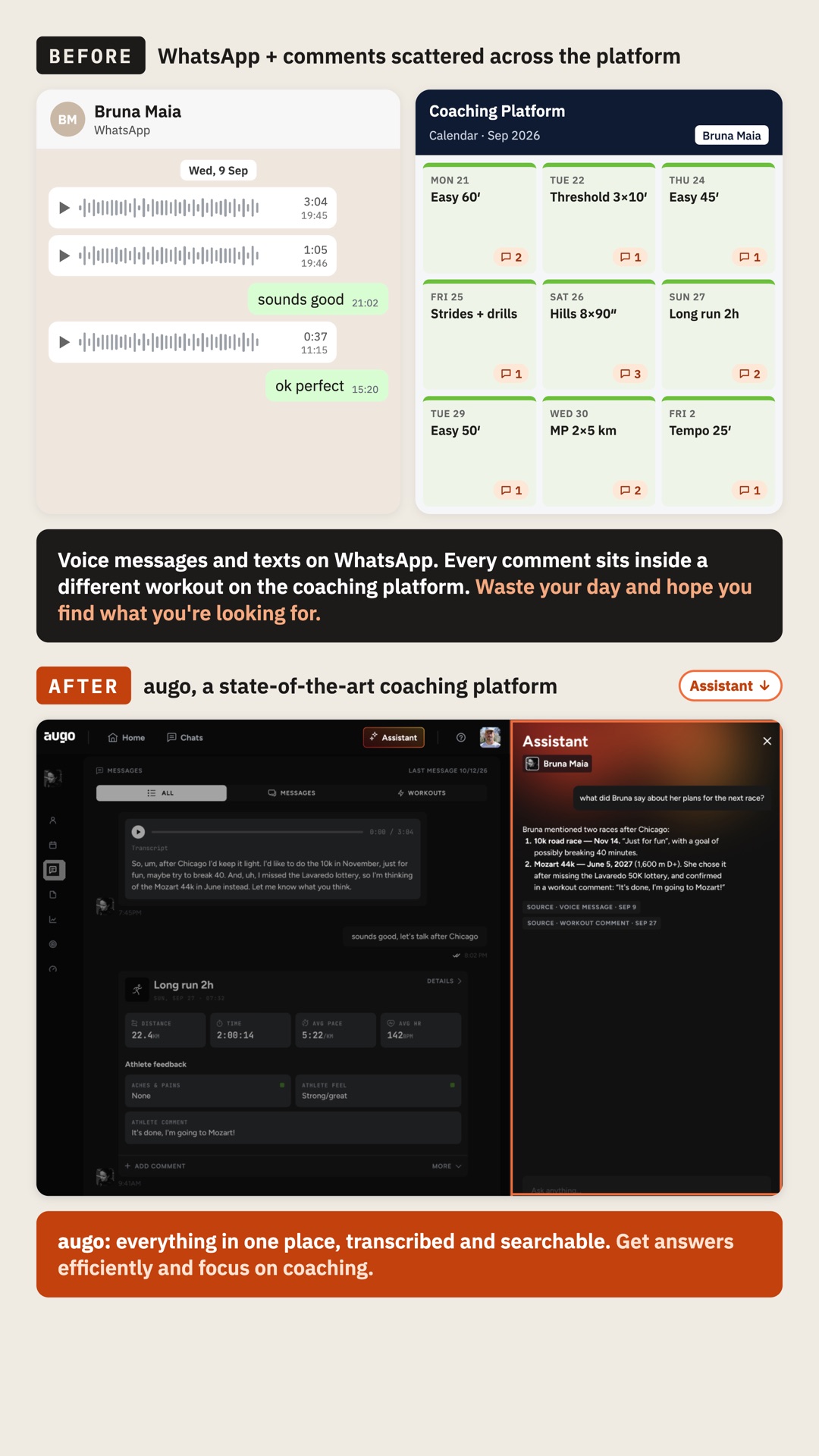
It’s simple things, but they save hours, and this is how coaching should be in 2026.
The previous way (either “banning” athletes from sending voice messages, hence leading to poor communication, or just wasting our time all day) is over.
Workout and Training Block Planning
Another aspect I want to highlight here is how much better it is to create workouts and training blocks or plans using augo.
I used to have a million variants of the same thing on TrainingPeaks, because the alternative is a huge pain in the ass: changing manually everything every time you want to progress a workout or simply to do things a bit differently. You have planned 8 x 90” but the athlete has a track near home and wants to go there; in TrainingPeaks (or any other tool) you’d have to build another workout or edit entirely the current one, often forgetting some minor thing (e.g. I update the actual intervals but forget about the description or even the title), creating inconsistencies for something that, once again, is not really what you should be spending your time doing as a coach. In augo, I have ONE workout per category in my library, because I still want my own words and description of what that type of workout is, but then every time I build something, I just talk to the assistant: hey let’s change the 8 x 90” into a 8 x 400m, or let’s progress it to 10 x 90”, and it’s all done, without ever touching the “workout builder”.
Another case where augo comes in handy is as we get near the race, since I start shifting from prescribing using perceived effort to prescribing to hit a certain pace for the marathon. Before, I’d either need to build new workouts or I would use notes that I put on the calendar and get priority with respect to what the planned workout says, an implicit rule that coaches reading this would get, but also something suboptimal that creates confusion. Once again in augo I can say: hey, for the next long run with intensity, let’s call the intensity marathon-pace and let’s plan to hit a range between 4:15 and 4:20 min/km. Done. Simple things that make your life as a coach so much better.
Finally, creating training blocks. Each athlete is different and has different lives, leading to different weekly structures, of course. For Bruna, some days she’s got tennis, other days she’s cycling, other days she has time to go out for a long run, etc. - this “template” can be even automatically derived by Claude when you link it to augo.
When I build a new block, I ask Claude to draft the next 4 weeks based on Bruna’s typical training availability, and then I focus on adding the key sessions I think we should be doing to get her ready for a good marathon. Once I’m done, Claude can push the entire block to augo, thanks to the MCP Connector I discussed in an earlier blog. As you can see, in augo we use AI for dumb tasks that you can quickly double-check, admin work, so that I can spend more time trying to understand where we are with respect to where we want to be, which training blocks or sessions might get us there, and do what I think coaching is, as opposed to dragging and renaming boxes.
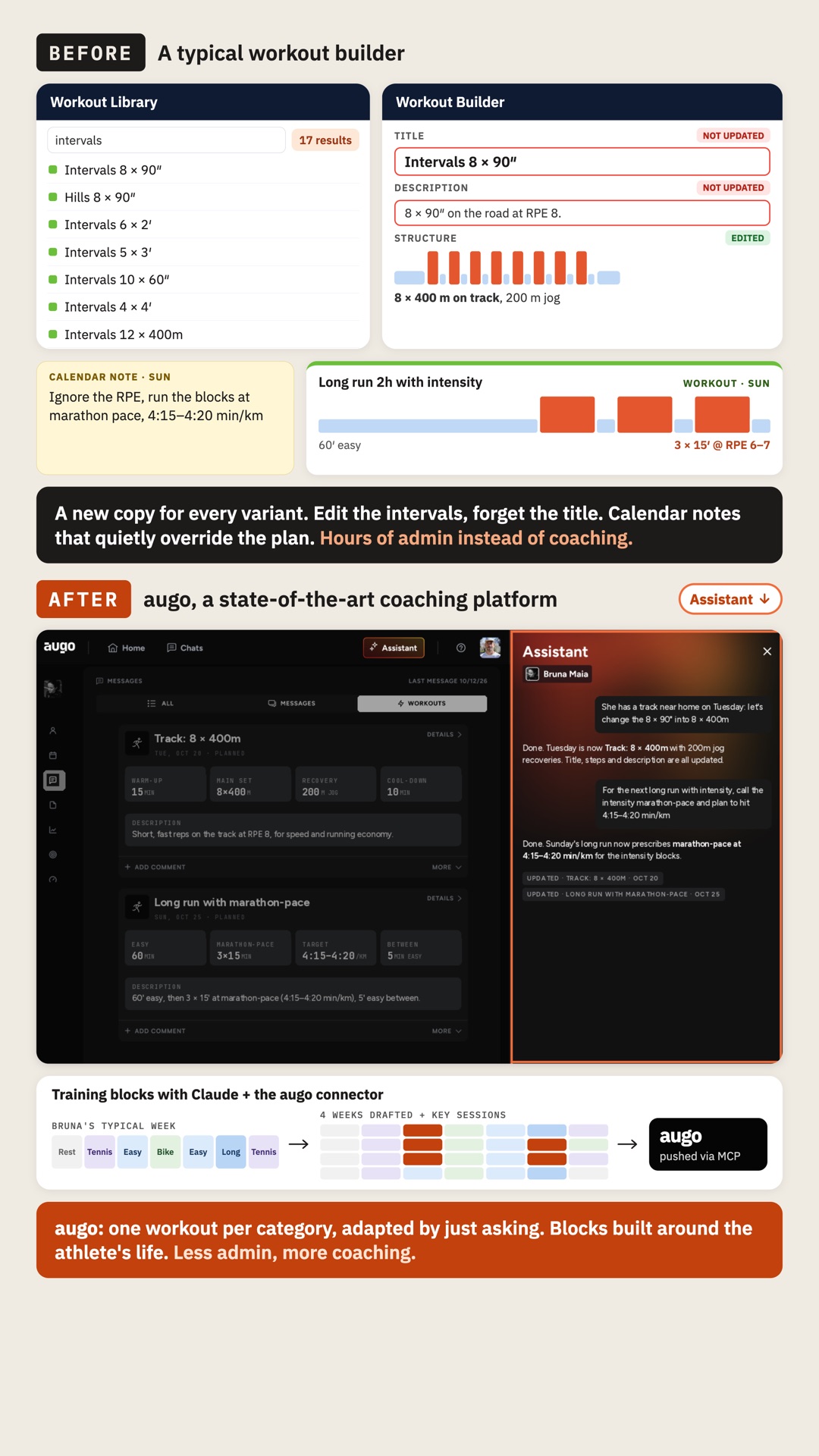
As a result, in augo my library can be minimal, and I can use Claude or the AI assistant in augo to build variations of a session and entire blocks without ever touching the “workout building UI”.
There is no new tool to learn, there is no library to move (even though if you can’t see the future yet, you can also export/import your library), because you can just talk to the assistant and let the system build what you need for a given athlete. It’s a paradigm shift.
Workout Analysis
Workout analysis starts with subjective feedback, which is front and center in augo. After each run, I knew how Bruna felt, if she had any physical issue, how much she ate for breakfast and during the run, etc. (see an example in Bruna’s instagram).
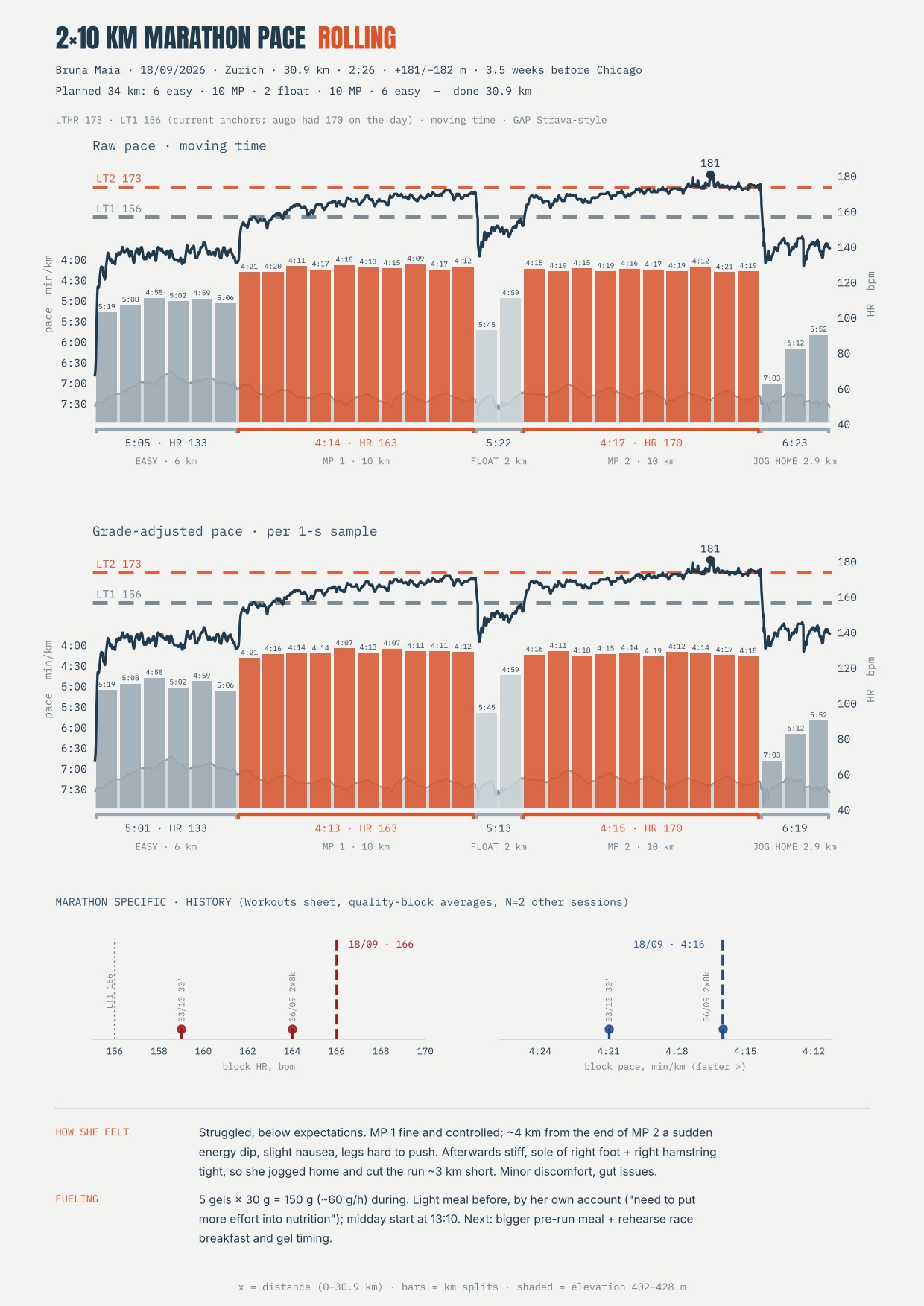
Then, we also look at workout data, and instead of having to select sub-sections of the data or relying on a myriad of the most useless plots ever designed (you know what I’m talking about), or scroll endless tables with splits (how hard can it be to average the splits? Please, I’m listening), you can just get the graphs you need by linking augo with Claude, and instructing the AI to process every workout in the way you consider the most useful to you. For example, for a trail workout, I want climbs and descents to be automatically detected and various parameters to be shown to me, in a way that is simply not available in outdated software.
I think this is how things need to be done because, as coaches (and athletes) we all want to look at slightly different things, which is also why some of the outdated software currently used has a library with a million useless graphs. The solution is not to have even more useless graphs, but it is to go custom: you get what you need, because you don’t have to code it; you just have to explain it to an AI assistant, once.
Here is what I built for my athletes, so that I can see what I care about after a hard session (their feedback + external and internal load with respect to their thresholds, GAP, for example), and how the latest session compares with the previous history of the athlete (density plots of external and internal load for a given stimulus, e.g. marathon pace here):
You can even schedule a task on Claude that each day at 6am goes into augo, looks at workouts from the previous day, and provides you with a set of analysis or graphs that you have previously instructed to build, so that you can analyze what you think matters, together with any other messages or else that is logged in augo, in the chat, in voice messages, in comments, where the relevant information is, you will see it easily without getting lost in WhatsApp where your mom and your athletes fight for attention.
Coaching has changed for the better. Get up to speed.